Why you still can't put a live web page on a wall in VR
I wanted to hang a live web page (a real Vue/React UI, with state and buttons) on a wall inside a WebXR scene. You can’t do it. The why is more interesting than the can’t.
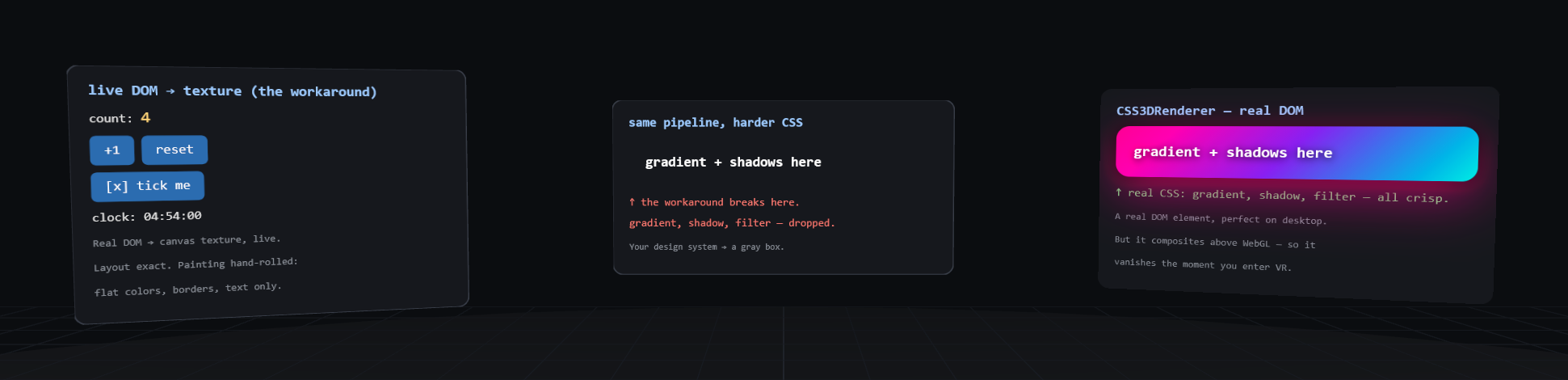
The image above is three panels floating in a WebXR scene. The first two are live DOM rasterized to a texture with three.js HTMLMesh: the left one works; the middle one runs the same DOM through the same pipeline, and its gradient-and-shadow card collapses to flat text on a gray box (gradient, box-shadow and filter, all silently dropped). The third, on the right, renders that same card perfectly, because it’s real DOM via CSS3DRenderer. It’s also the one panel that disappears the instant you enter VR. That contradiction is the whole post.
Open the live demo: click the counter, orbit the scene →
The wall is security, not engineering effort
Browsers deliberately offer no API that turns rendered DOM into readable pixels. The canvas spec makes this explicit: every canvas has an origin-clean flag, and once you draw non-CORS cross-origin content into it, getImageData() and toDataURL() start throwing SecurityError. The reasoning generalizes: if JS could read back the pixels of a rendered page, it would exfiltrate cross-origin iframes, your logged-in sessions, even your history. Browsers already lie to getComputedStyle about :visited links for exactly this reason.
WebXR inherits the wall. XR layers accept GPU textures, never DOM. As of mid-2026 there is no shipped API (and no incubated one) that renders a live DOM subtree as a surface in an immersive scene. The closest thing is proposal issue #80 “CSS 3D inside WebXR”, open since 2022, with no explainer and no implementers.
One precise caveat. The wall is on reading rendered pixels, not on compositing them. WebXR’s DOM Overlay already composites a live DOM element on top of an immersive scene, and XR media layers composite a <video> straight into a quad in the world, both drawn by the compositor with JS never touching the pixels. A DOM subtree as an in-world layer would be the same shape of safe thing. It just hasn’t been built. So the workarounds below are blocked by the readback wall; a clean primitive is blocked only by vendor priorities.
The workarounds, and what they cost
three.js HTMLMesh doesn’t use html2canvas. It hand-rolls its own tiny version of the same idea: it walks the DOM, reads getComputedStyle, and re-paints everything by hand onto a 2D canvas that becomes your texture. Layout is exact (the browser did it). Painting is a subset: background-color, borders, border-radius, text, a few input types. Gradients, box-shadow, text-shadow, filters and background images are silently dropped. Interaction is re-dispatched synthetic mouse events mapped from the ray’s UV coordinates. And since getComputedStyle stops updating once you’re in an immersive session, :hover states quietly die too (three.js #25927).
The demo shows both halves of this: the left panel is a live counter with a ticking clock that genuinely works (click it); the right panel is a gradient-and-shadow card put through the same pipeline.
html2canvas is the same idea as a standalone library, with the same shape of limits. Its own docs warn it “may not be 100% accurate” because it re-implements CSS instead of screenshotting. Fine for a static snapshot; it’s not a live UI surface.
WebXR DOM Overlays sound like the answer and aren’t. The spec composites one DOM element as a topmost 2D layer above the XR content: a HUD, UA-controlled, explicitly never occluded by the world. Shipped support is essentially Chromium on handheld AR. It’s a heads-up display, not a page on a wall.
CSS3DRenderer gives you real DOM with real CSS in 3D, composited by the browser above the WebGL canvas. Nothing but XRWebGLLayer reaches the headset, so the moment you enter an immersive session, your UI stays on the monitor. The demo’s third panel is exactly this: the same gradient-and-shadow card that HTMLMesh flattens is rendered here pixel-perfect, then vanishes the instant you press Enter VR, because it was never in the layer the headset sees.
pmndrs uikit and react-xr-ui take the honest way out: no DOM at all. React components, yoga flexbox layout, glyphs and rects rendered straight to WebGL. This genuinely works in immersive mode, but it’s a re-implementation of UI, not your web app. Your design system, your components, your CSS: none of it comes along.
Native doesn’t have this problem
Meta’s Spatial SDK hosts Android panels (WebViews included) as surfaces in immersive scenes. visionOS floats Safari windows in your space. Unity devs buy Vuplex 3D WebView and get a real Chromium on a texture. “A browser in the scene” is a solved problem everywhere except the open web, where it’s blocked on purpose.
So
The pitch “VR UI will be built by the army of web developers using the frameworks they already know” runs into the browser security model before it runs into anything else. Until someone designs a DOM-layer primitive that doesn’t leak pixels (don’t hold your breath), the realistic options are a native WebView shell, or React-without-DOM. The web is, for once, the platform that’s behind.
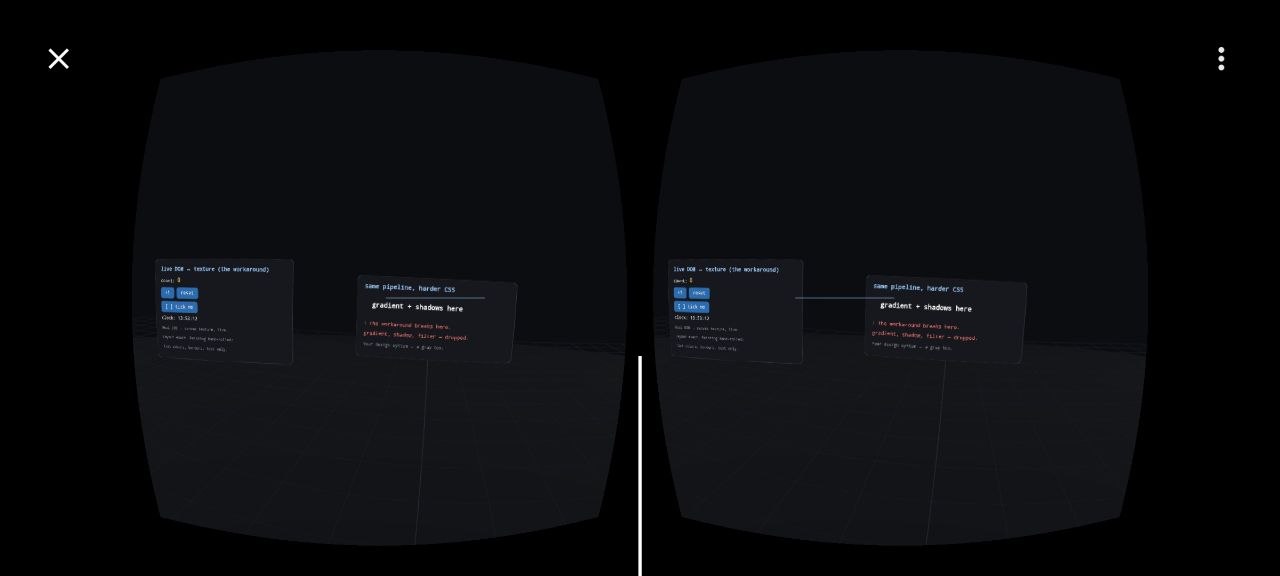
The exact same scene, now from inside VR (stereo pair, phone viewer). Compare it with the desktop shot at the top of this post: the third panel (the one with the pixel-perfect gradient) is simply gone. The two HTMLMesh panels are still there; the CSS3DRenderer one was never in the layer the headset sees. Desktop: three panels. VR: two.
The rest checks out too. On desktop the counter, clock and toggle all update through the same event path HTMLMesh uses for controller rays; in an earlier immersive session I drove them from inside VR by pointing at the buttons. The HTMLMesh limits earlier aren’t a small-screen or desktop artifact. They’re the pipeline, identical in both.